| Workspace | The boundary for your data and spend. It owns agents, channels, integrations, conversations, credits, and billing. | Plan and credits |
| Agent | An AI worker with its own instructions, guardrails, tools, data sources, and channels. You request an agent and the Kylo team reviews the request before it goes live. | Agents |
| Channel | A surface where the agent talks to customers: WhatsApp or Website chat today. Email, Messenger, and Instagram are not available yet. | Channels |
| Integration | A connection to another system the agent can use during a turn. Zoho CRM and Brightcall are available. | Integrations |
| Template | A pre-approved message used to start a conversation. On WhatsApp, Meta reviews each template before you can send it. | Templates |
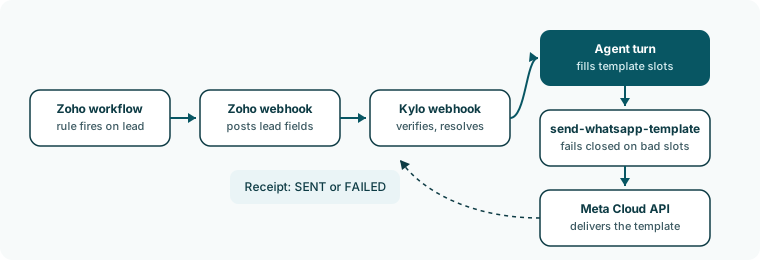
| Trigger | A Zoho automation that Kylo installs. When the lead event happens in Zoho, the trigger tells Kylo to run the agent for that lead. | Send triggers |
| Campaign | A binding of one trigger to one template under one agent, with a status you can pause or stop. | Campaigns |
| Send receipt | The record of one send attempt. It shows whether the message is in flight, sent, or failed, and keeps the provider’s answer. | How a send works |
| Credit | The unit the workspace spends. One credit is one outbound reply. Inbound messages are free. | Plan and credits |

 Inbound is shorter. A customer writes on a channel, the agent answers from its instructions and data sources, and the thread appears in Conversations.