
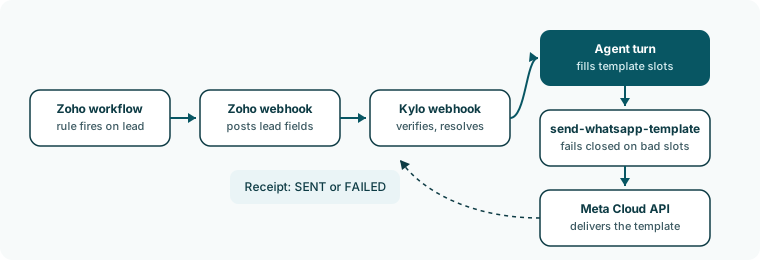
The path
- Zoho posts the event. The installed workflow rule posts the lead’s merge fields to Kylo’s Zoho webhook. The post carries your connection’s secret in the
x-kylo-zoho-webhook-secretheader and a Kylo trigger name. - Kylo authenticates the post. A post with no secret, no trigger name, or no record id, or with a secret that matches no connection, gets a
403and nothing else happens. The connection must also be Connected. - Kylo finds the campaigns. Every Active campaign of that agent whose trigger uses this automation is a candidate. Paused and stopped campaigns are not.
- Kylo fetches the lead from Zoho. One fetch serves all candidate campaigns. If it fails, the send is skipped with
needs_reconnectorlead_fetch_failed. - Each campaign runs its gates. The tag gate comes first when the trigger has a tag, then four decision gates in this order.
- Kylo claims the receipt. An atomic claim for this campaign and lead prevents two simultaneous events from sending twice.
- The agent turn runs. One turn, marked as an outbound trigger.
- The send tool checks and posts. Kylo validates the call, posts the template to Meta, and settles the receipt.
- The thread is recorded. The sent message appears in Conversations with delivery marks.
The gates and their skip reasons
What the agent turn does
The turn’s input is a fixed instruction: callsend-whatsapp-template exactly once with the campaign’s template, fill each {{n}} from the lead record as slots, never send a blank value, and do not answer with text. The turn also receives the trigger name, the template language and body, and the lead record. If the lead already has a WhatsApp conversation, the agent can read it but writes nothing back.
What the send tool checks
Kylo retries a send once when Meta answers 130429 or 131056, which are rate limits that clear with a short wait. Other Meta errors are final for that send. See Send errors.
A send that reached Meta counts as sent even if the turn failed afterwards. The tool outcome decides the receipt, not the turn.
Where you see the result
- Campaigns: the Sent and Failed counters.
- Logs: every skip and every success writes a line from the source Zoho CRM. A skip reads “Template send skipped: ” and a success reads “Outbound template sent”. See Logs.
- Conversations: sent messages appear on the lead’s thread. See Thread and ticks.
Monitor sends
Follow a campaign from the counters to the conversation.