
Which connections Kylo keeps alive
Meta warns that token lifetimes can change without notice and that tokens can expire early. Do not plan around exactly 60 days.
The daily sweep
Kylo runs a sweep every day at/api/cron/whatsapp-tokens. It scans connections whose recorded expiry is inside the next 14 days or already past.
- For each one, Kylo exchanges the stored token for a fresh long-lived token through Meta’s
fb_exchange_tokengrant, while the old token is still valid. A successful exchange stores the new token and its new expiry. You see nothing. - If Meta rejects the token as invalid, the exchange cannot recover it. Kylo sets the connection status to Disconnected.
- If the exchange fails for another reason, such as a Meta outage, Kylo leaves the connection as it is and tries again on the next sweep.
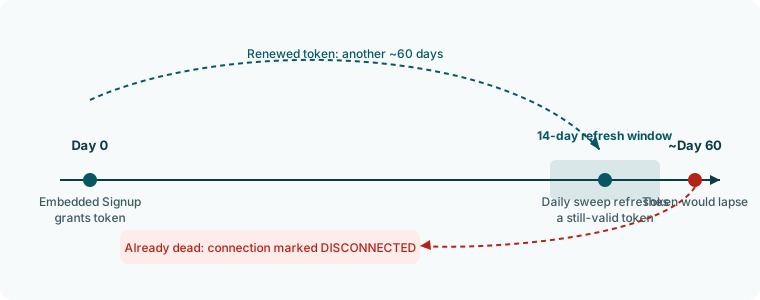
The sweep only reads connections that have a recorded expiry. A connection made with the Access token tab has none, so the sweep never touches it, and an expired token there is found when a send fails.
What you see when a token dies
- The Status row on the WhatsApp page, Connection tab reads Disconnected after the sweep marks it. The WhatsApp card on Channels still shows Manage.
- Before the sweep runs, or for an access token connection, nothing marks it. Sends fail and the receipt keeps Meta’s error, typically error 190 “Access token expired”. See Send errors.
What does not expire
The access token is the only part that expires. The WhatsApp account, the phone number registration, the webhook subscription at Meta, and your templates are unaffected. Reconnecting restores sending without recreating them.Fix a dead token
- Open Channels, then Manage on the WhatsApp card, and select Disconnect.
- Select Connect and run Facebook login again, or paste a new token on the Access token tab.