
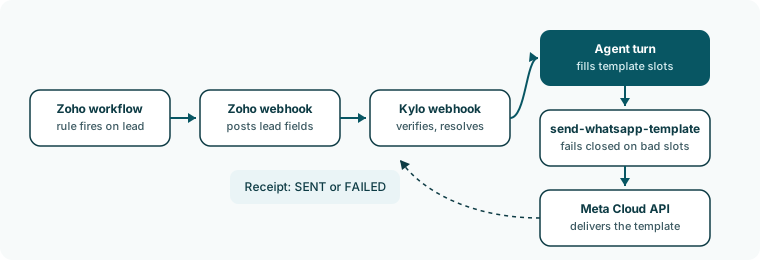
The parts
A trigger does nothing until a campaign uses it. Kylo says so on the Triggers page: “A trigger does nothing until a campaign uses it.”
What the agent does on a trigger
The webhook does not post the message itself. It starts one agent turn marked as an outbound trigger. The agent receives the trigger name, the template’s name, language, and body, and the lead record from Zoho, and its only job is to callsend-whatsapp-template once. It fills each {{n}} variable from the lead record. If the agent never makes the call, the turn fails and the receipt settles as failed with no_tool_call. If the lead already has a WhatsApp conversation, the turn can read it but writes nothing back to the agent’s memory.
Set it up
- Connect Zoho CRM and install an automation.
- Create a WhatsApp template and wait for Active.
- Create a trigger.
- Create a campaign.
- Monitor sends.
How a send works
Every gate, in order, and the reason each skip records.
Campaigns
Statuses, receipts, and dedupe.